
Seedance 2.0 Reference Video: How to Copy a Camera Move (Fast, Tested)
How reference video works in Seedance 2.0 Fast: limits, prompt wording, what carries over, what it costs, and a real test that turns a surf shot into a snowboard run.
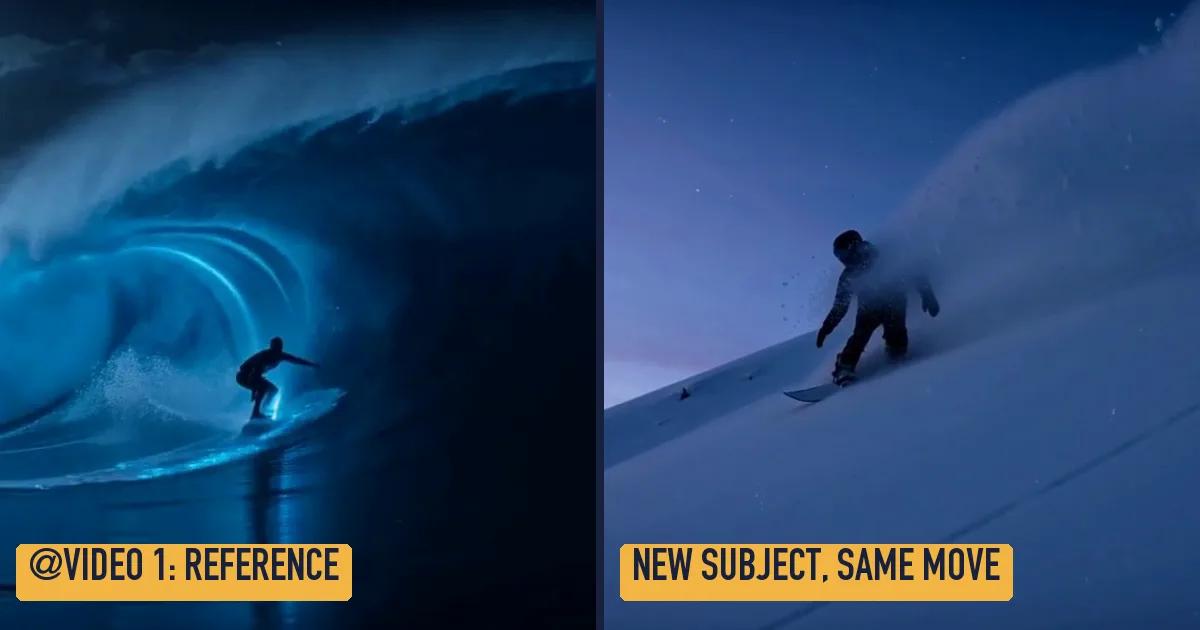
A reference video tells Seedance 2.0 how the shot should move, not what should be in it. Upload a clip of 2 to 15 seconds, name it @Video 1 in your prompt, and describe the new subject: the model reuses the camera path, pace and framing and renders a new scene with its own soundtrack. On Seedance 2.0 Fast you can attach up to three clips per run, 15 seconds in total.
Most guides online stop there, or mix up reference mode with video editing. Below is what ByteDance documents, what a real test on Seedance21 Fast produced, and the prompt wording that worked.
Reference video at a glance
| Seedance 2.0 Fast | |
|---|---|
| Clips per run | Up to 3 (Volcengine API docs) |
| Length | 2 to 15 seconds each, 15 seconds in total |
| Formats | mp4 or mov, 24 to 60 fps, under 200 MB each (same docs) |
| Mix with images and audio | Yes: up to 9 images and 3 audio files in the same run |
| How to refer to it | @Video 1, @Video 2 in upload order |
| Output | 4 to 15 seconds, six aspect ratios, sound generated in the same pass |
Two limits from the same documentation are easy to miss. First and last frame mode cannot be combined with reference inputs in one request. And reference media that shows a real person's face can be refused unless that person is verified; an Adobe staff member confirmed this for Seedance 2.0 and 2.0 Fast.
Reference or edit: pick the right mode
Both modes start from an uploaded clip, and they solve different problems.
- Reference borrows motion. The subject, place and style come from your prompt; only the camera work and timing come from the clip. Use it to reuse a drone move, a tracking shot or a dance rhythm on something new.
- Edit keeps the clip. The subject and camera path stay, and the prompt changes the look: time of day, weather, season, wardrobe.
We ran both on the same 5-second source, a night surfer on a glowing wave that Seedance 2.0 Fast made from text:
The test: a surf shot reused for a snowboard run
With the surfer clip attached and Use as reference selected, this prompt went to WaveSpeed's reference-to-video turbo endpoint at 720p, 4 seconds:
Follow the low tracking camera movement and timing of @Video 1, but the subject is a snowboarder carving through deep powder snow on a mountain slope at dusk, snow spray arcing behind the board. Wind and crunching snow. No text, no logos, no brand names.
Probar este promptWhat carried over: the low camera skimming the surface, the rider moving left to right across the frame, and the spray trailing behind. What did not: the shape of the frame. The source was 21:9 and we asked for 16:9, and the model simply recomposed. The render took 214 seconds, and the clip came back with wind and snow on the soundtrack.
For comparison, the same source in Edit mode with "turn the night into a golden sunset, keep the surfer, the wave shape and the camera move" kept the rider and the wave and changed only the light (304 seconds):
Prompt wording that works
- Say what to take from the clip. "Follow the camera movement and timing of @Video 1" is clearer than just mentioning
@Video 1. - Say what replaces it. "but the subject is a snowboarder..." makes the swap explicit, so the model does not copy the surfer too.
- Describe the sound. References do not carry audio over unless you add an audio file; name the ambience you want.
- Keep the reference short. Every reference second is billed (see below), and a 3 to 5 second clip with one clear move was enough in our test.
- Leave out real faces and logos in the clip. Faces can trigger a refusal, and logos tend to reappear.
What a reference video costs
On WaveSpeed's Seedance 2.0 Fast turbo endpoints, a run with a reference clip is priced in two parts, according to the model page: $0.065 per second of reference plus requested output, and an output upscale of $0.02 per output second at 720p ($0.04 at 1080p). Each clip counts as at least 2 seconds and the total is rounded up to a whole second.
On Seedance21 Fast that is 13 credits per reference and output second plus 4 (720p) or 8 (1080p) per output second. Our test, a 5.06-second reference and 4 seconds of output, came to (6 + 4) × 13 + 4 × 4 = 146 credits. A plain 4-second text-to-video clip at 720p is 96 credits, so the reference added about half. The generate button shows the exact figure, read from your clip's length, before anything is charged.
Limits we would flag
- Quality is capped at 720p natively. ByteDance's API documentation lists 480p and 720p for Fast; 1080p on WaveSpeed is an upscale.
- It is not motion capture. The model follows the overall path and rhythm, not every limb. For a dance you want copied step by step, results vary.
- Render times are minutes, not seconds. Our Seedance 2.0 Fast turbo runs took 200 to 350 seconds for 4 to 5 second clips. ByteDance has not published official timings.
FAQ
What is reference to video in Seedance 2.0?
It is the mode where you give the model images, video clips or audio as references and describe a new scene. Images supply characters, products or places; a video supplies motion and camera work; audio supplies rhythm or voice. In the API it is the reference-to-video endpoint, and text-to-video accepts the same reference fields.
How long can a Seedance 2.0 reference video be?
Each clip must be 2 to 15 seconds, and all clips together may not exceed 15 seconds, per ByteDance's API documentation. Shorter clips are counted as 2 seconds for billing on WaveSpeed.
Can Seedance 2.0 Fast edit a video instead?
Yes. Video edit is a separate endpoint: upload the clip, choose Edit and describe the change. It keeps the subject and the camera path, whereas reference mode replaces the subject and keeps only the motion.
Can I use a reference video and reference images together?
Yes. One run can hold up to 9 images, 3 videos and 3 audio files. Name each in the prompt by type and order, for example: the character from @Image 1 follows the camera move of @Video 1.
Why was my reference video rejected?
The most common reasons are a real person's face in the clip, a clip shorter than 2 seconds or longer than 15, or a combined length above 15 seconds. Trim the clip, or use one without identifiable faces.
Want to try it? Open the generator, upload a short clip, choose Use as reference and describe the new subject.